
Introducing Dexco - My Forever Neovim Colour Scheme
Alright, it's probably not my forever colour scheme, but it's definitely my current colour scheme.
First, the most pressing question:
Why make a colour scheme at all?
Especially with so many other good options out there, like Tokyo Night, Catppuccin, Rose Pine, or hundreds more.
Well, there is a much higher-level aspect to the question about configuring your own developer
experience for you, and only you - but colour schemes aren't necessarily the best proxy for that
conversation. This would be better suited to a discussion about Neovim distributions (like LazyVim or Kickstart) - which I'll
probably talk about once my dotfiles are finally online somewhere.
As far as the colour scheme itself... I want my developer experience to be comfortable and productive. Pretty would be nice, but it's definitely an afterthought. Part of that productivity goal is staying consistent with other tools I use today.
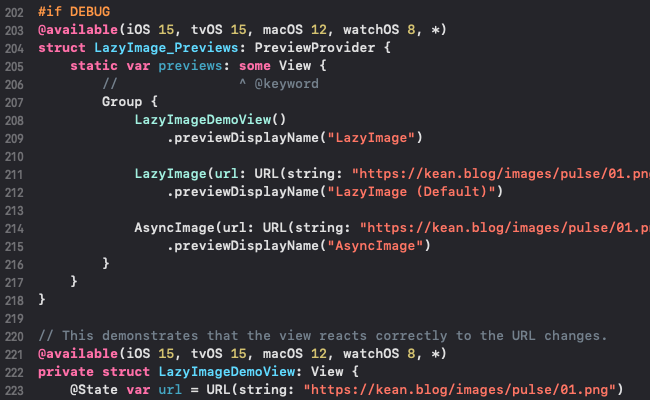
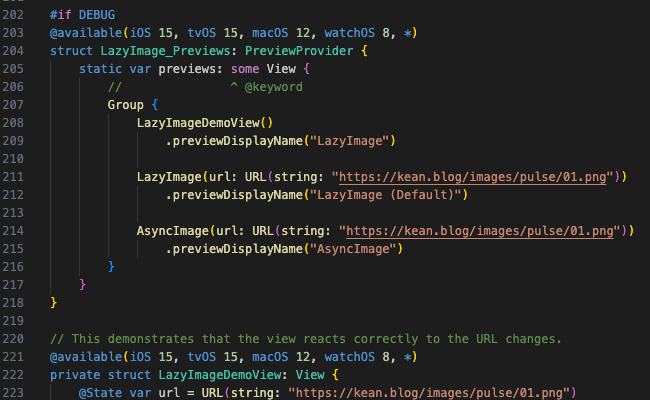
Previously, I defaulted to Tokyo Night whenever I'd work in Neovim. However, I also use VSCode and XCode for development - and everytime I would switch editors, there was this weird mental "hiccup" (for lack of a better way to explain it). Every time I switched editors, I'd use their default themes and the same keywords and text would be highlighted differently. It was a really small problem, but it was just enough to distract me for a few seconds every time it happened. I swap editors maybe 10 times a day, but I don't look at it as 20-30 seconds of annoyance in a day, I look at it as 10 distinct distractions from my focus that I can eliminate without much effort.
Other than the Swift LSP not working (so the XCode highlighting looks odd in this example) this is what the same snippet of code looks like swapping between...
XCode:
VSCode:
Neovim:
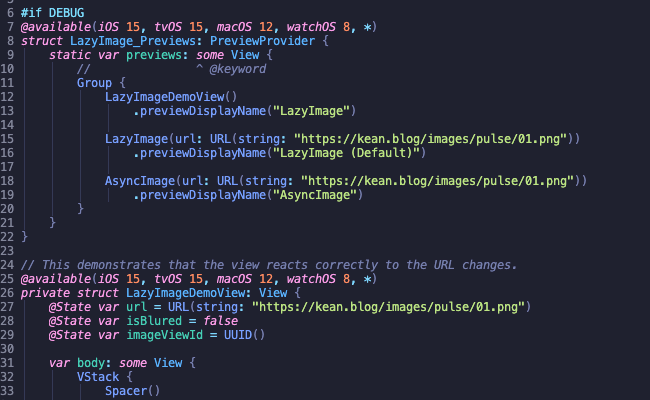
This isn't the worst, especially since I'm ramping up Neovim to stop using VSCode, but I'll still be using XCode for the foreseeable future building iOS and macOS apps. Oddly, the fact that the whole UI changes doesn't bug me - and I rarely even notice it. Usually I keep the in-IDE panes minimized and just focus on the code - so when the code changes, it bugs me.
Why build it from scratch?
I guess I could fork a popular colour scheme and make my changes to it, but I don't like that approach. I think if you're trying to tailor something specifically to your workflow, you should be familiar with the thing itself. As this is just a theme, it really wouldn't matter one way or the other. But, if I forked Tokyo Night and started customizing it - I'd end up abandoning or deleting a bunch of themed plugins that I don't use. If I leave them alone, then it's just repo clutter that I might need to search through later on. If I'm already going to be digging through the code to figure out what I want and don't want, why not just start from the most minimal theme and add only what I need, as I need it.
Just to emphasize how minimal it is, as of today (October 10th, 2025), there are no colours on my theme other than Tree-sitter and LSP Semantic Token highlighting. Everything else is black, white, or cyan. I don't even know where those colours come from, nor do I care right now. I mostly have the file explorer open to help centre source code on my screen, and when I need to open a file, I fuzzy find it pretty quickly.
Why Xcode's theme?
Since I'll be developing in XCode anyways, and I want consistency, starting with their default theme feels like a smart idea. I could also come up with a new Neovim theme and back port that to XCode - but somehow that feels like more effort.
And frankly, I find XCode's default theme to be simple, clean, and incredibly readable. "Incredibly readable" is such a bizarre phrase, but it's the only way I can describe it. SF Mono is a nice developer-centric font, the colours all pop on dark mode, and the colour palette has some very subtle differences between similar concepts - while keeping overt differences for differing concepts.
I guess the most precise thought I have is that: Most themes are made to look pretty first, functionality is bolted on after the fact. XCode's theme seems functional first, pretty second.
Three easy steps
Alright, enough preamble, this is how I built my first Neovim plugin.
Boilerplate
Having never written a Neovim plugin before, I jumped over to Tokyo Night to see what I need and
where. However, there are a ton of files. Then, I went to a smaller colour scheme - Synthweave - and saw some files that overlapped with Tokyo Night. I was about to start
cargo culting, but a few seconds later I remembered that I'm using Neovim, which has the best
goddamn docs around, and I could type :h colorscheme and immediately figure out
what I needed to do:
Load color scheme {name}. This searches 'runtimepath' for the file "colors/{name}.{vim,lua}". The first one that is found is loaded.
In looking at popular colour schemes online, the files in colors/ tend to just be
single line requires back to the lua folder, where the implementation
lives. I don't know if this is just to split definition from implementation, or so colors/ can have multiple theme variants without a lot of clutter, or maybe there is
some historic or convention reason. I'm just doing it because all the cool people are doing it...
-- colors/dexco.lua
require("dexco").setup()
In the main module initialization, I require the module containing all the
highlight group information, iterate over each group and set the appropriate value (nvim_set_hl replaces whatever definition was previously there for the group):
-- lua/dexco/init.lua

local M = {}

M.setup = function()
  local groups = require("dexco.groups").setup()
  for group, setting in pairs(groups) do
    vim.api.nvim_set_hl(0, group, setting)
  end
end

return M
Creating the palette
As I'm matching Neovim's colour scheme to the one I use in XCode, I wrote a script that takes in
a xccolortheme plist file and uses that to create a palette.lua file
using the XCode syntax convention. This file contains all the colours I use in the theme.
-- lua/dexco/palette.lua

-- Generated from scripts/palette.py
return {
  attribute = "#bf8555",
  character = "#d0bf69",
  comment = "#6c7986",
  ...
  url = "#5482ff",
}
More Boilerplate
The most important piece of the puzzle is defining the file which actually maps your Tree-sitter
grammar or LSP semantic tokens into your palette. Tokyo Night has a groups module
with files for theming different parts of Neovim, and for theming plugins. As I've stated, I
only care about syntax, so for now I just have a single groups.lua file which
contains my Tree-sitter highlights and my LSP semantic token highlights. As the theme grows, I
might split this into multiple files - but for now, a monolithic approach is much easier to
tinker with.
-- lua/dexco/groups.lua

local M = {}

local c = require("dexco.palette")

M.setup = function()
  return {
    -- Identifiers
    ["@variable"] = { fg = c.plain }, -- various variable names
    ["@variable.builtin"] = { fg = c.keyword }, -- built-in variable names (e.g. this, self)
    ...
    -- Rust LSP
    ["@lsp.type.selfKeyword"] = { link = "@variable.builtin"},
    ["@lsp.typemod.static.declaration"] = { fg = c.declaration_other },
  }
end

return M
The set of available Tree-sitter query captures are located in the docs, as are the list of semantic token highlights which start with @lsp. For ease of use, I
grabbed all of them and put them in the file with appropriate documentation.
That's about it for the boilerplate part... You take your Tree-sitter and LSP identifiers, and map those against colours (or against a palette - in my case). You can set text colours, background colours, and other styles (e.g. bold, underlined, italic, etc...).
As a convenience, there is also link - which re-uses the style of the group you
point at. To make it easier to tweak later, I explicitly specified every Tree-sitter group, but
I link the LSP colours as-needed.
And the tedious step...
I'd like to say we're done, but we're actually just beginning. We can now call :colorscheme dexco - but that doesn't do much. When I began, I set every group to green
text (#00ff00). This shows up really well in dark mode and let's me progressively
fix up the theme if I've missed anything, but since it's readable (and looks kinda nice), I
don't need to stop working just to fix it.
From here on in, it's a matter of manually looking at code snippets from a few languages, with and without an LSP running, and then applying the correct palette to the correct highlight group. In my case, it was quick to start, as I just opened the same Swift file in both XCode and Neovim and started picking stuff I wanted highlighted. One thing I wish I knew before I started is that sometimes the Tree-sitter results are actually more accurate than the LSP's, somehow. That speaks more to the quality of the given LSP than it does anything else I think.
Also, from what I can tell, XCode uses even more information than just the SourceKit-LSP - because I can open up the exact same project in Neovim and Xcode, and SourceKit will tell me incorrect, or less specific, identifiers for some tokens. I haven't dug into this too much, but it's also not a big enough deal to spend time on.
Anyways, the theming process was tedious, but only took a few hours overall - and the process of learning, and then making, my first Neovim plugin (this colour scheme) was less than a day. If I had to do it again (knowing all the tips, tricks, and quirks), the whole process would probably take 2-3 hours at a casual pace.
The most important tip and/or trick is to use Neovim's or VSCode's inspector.
Using Neovim's inspector
In Neovim, place the cursor over a character of interest (word, operator, other kind of token)
and then use :Inspect to see the associated native syntax, and/or Tree-sitter info
(if you have an installed grammar), and/or LSP semantic token (if you have an LSP running). This
is what a Svelte type for my blog produces:
Treesitter
  - @none.svelte links to @none   priority: 100   language: svelte
  - @type.typescript links to @type   priority: 100   language: typescript

Semantic Tokens
  - @lsp.type.type.svelte links to @lsp.type.type   priority: 125
Using VSCode's inspector
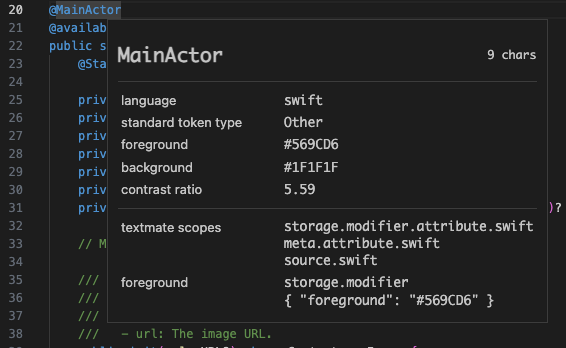
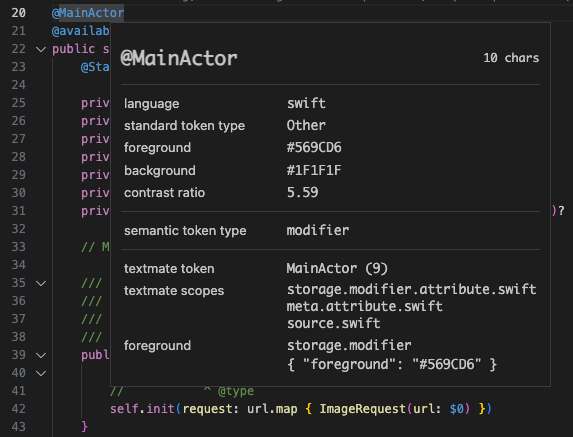
While just exploring LSPs, I found VSCode's token inspector to be more useful than Neovim's as I could quickly click around to inspect source code and it would show me what the LSP was reporting. Since the LSP should show the same semantic tokens regardless of client, the data should be just as valid. But, since VSCode uses TextMate and not Tree-sitter, this would not be useful for the Tree-sitter phase of colour scheming and you see a lot of the TextMate junk.
Without an LSP:
With an LSP:
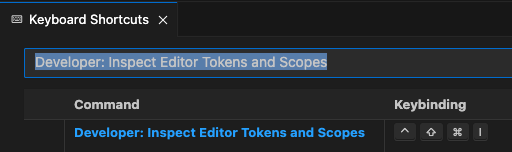
The VSCode docs suggest creating a keybinding for the inspector, and I highly agree.
Show me what you got
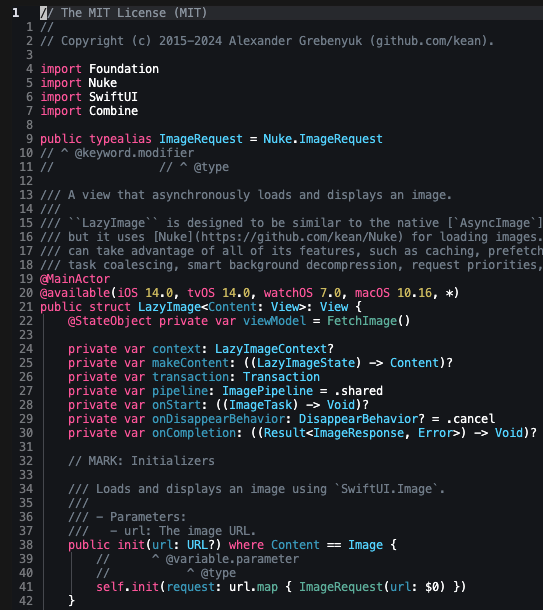
Here is what Dexco looks like highlighting...
Swift:
Rust:
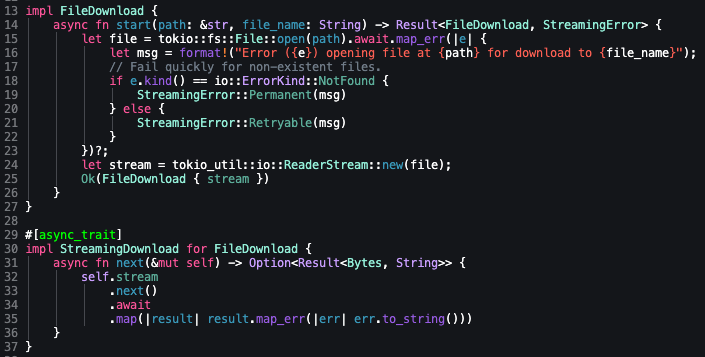
Python:
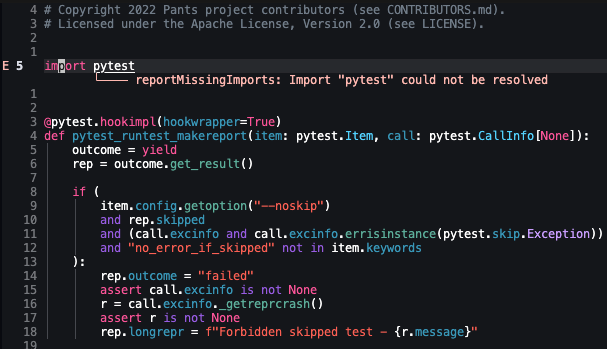
And what I don't got
If I don't have tree-sitter or an LSP installed for a language, the code is completely plain (e.g. Kotlin). I don't write as much Android code as I used to, so I don't need a perpetually installed Tree-sitter grammar or LSP - but I'll occasionally review a PR locally or in (styled) Github.
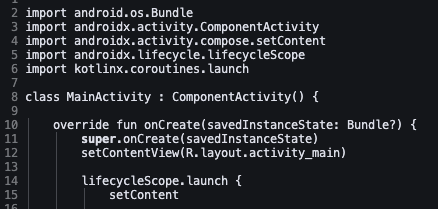
I mentioned it briefly above, but I use a sentinel colour that is still readable with dark
themes to show me when I need to update my theme with something I forgot, or a new token.
Svelte's LSP, for some reason, uses type.type which isn't covered anywhere and
would need an exclusion. The best example of this would be the Markdown for this post:
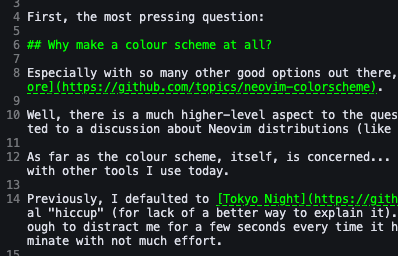
Honestly, I kinda like it. The URL colour needs to change for sure, but I could happily keep that green on black for headers.
Dammit Apple
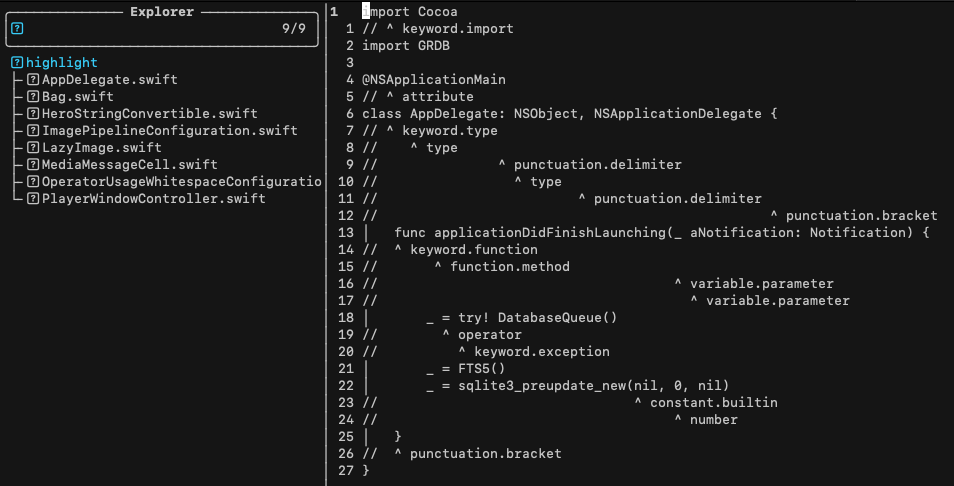
So as much as I like Apple's XCode colour scheme, the Terminal.app can't handle colours worth shit. More specifically, it can handle 256 colours, but not truecolor. Actually, it's one of the few terminals that doesn't handle colours in any modern fashion. I can't bring myself to install a different terminal when the OS comes with one already, and this default one does about 98.4% of what I need.
But, the default Terminal.app also makes Neovim look like this:
BUT! I almost forgot, I can just set termguicolors in Neovim and get proper colours
there, right?
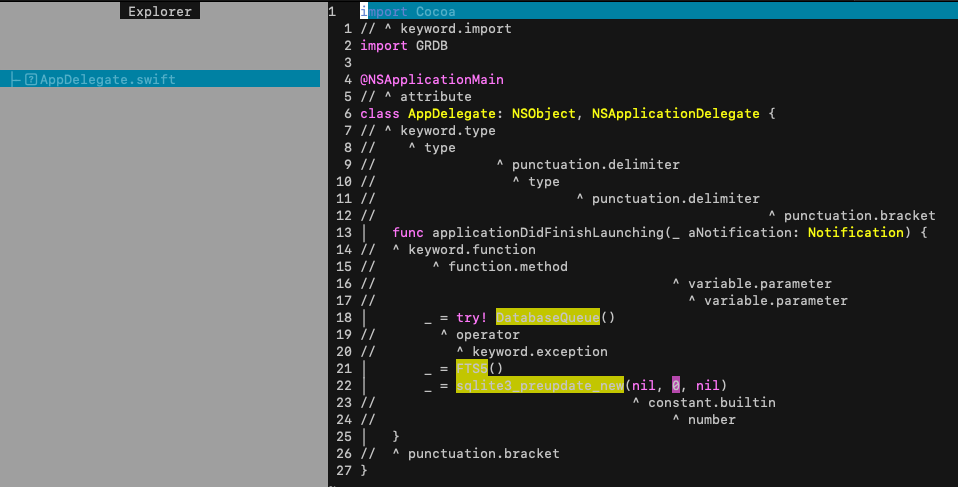
Uhhh, maybe not.
Never fear, tmux to the rescue!
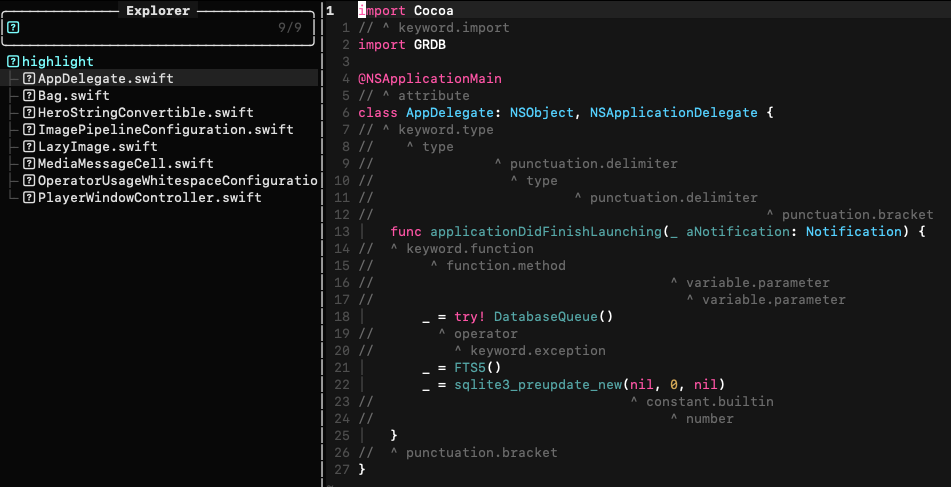
I think there is a setting in tmux you need to set to enable this, but instead I
just set vim.o.termguicolors = true in Dexco and called it a day.
What I really need to do, though, is just stop using Mac entirely and embrace the Linsanity.