
GitHub Actions has Convenient Cronjobs and Horrific Timeouts

I'm an avid cron user. I
use it all the time and for everything I can think of. I can probably hop on to any server I've
ever provisioned and find something I added to crontab. Be it a bootleg Docker
memory usage tracker, or recurring database cleanup, or even just a periodic reboot of a flaky
server...
For whatever reason, though, I only just learned that GitHub Actions allows scheduled cron-like actions. It's not a new feature at all, it's been around for years - I've just never needed to use them. It wasn't until I was writing one of my other GitHub Actions articles that I read through the schedule reference and saw this was an option.
Nightly and weekly cronjobs
I created a couple of examples in my sureshjoshi/scratch repo:
name: Scheduled CI

on:
  schedule: # https://crontab.guru/
    - cron: '42 2 * * *' # Nightly at 2:42am
    - cron: '1 3 * * 0' # Weekly on Sunday at 3:01am

defaults:
  run:
    shell: bash

jobs:
  foo:
    runs-on: ubuntu-latest
    steps:
      - name: Nightly
        if: github.event.schedule == '42 2 * * *'
        run: echo "This step will run nightly"

      - name: Weekly
        if: github.event.schedule == '1 3 * * 0'
        run: echo "This step will run weekly"
I also added a link to crontab guru, as regardless how often I write them - my brain just won't remember the fields. I think it's the "weekday" at the end that throws me off.
This is a simple cronjob I've used sometimes in CI, where we might have incremental/partial builds or tests on PR branches, and then a full-fat nightly CI run and or automatic weekly uploads. This is limited to CI systems that are super slow or costly (obviously), but that happens sometimes.
It could also be used for nightly snapshot releases, as an automated version of the immutable release process.
A handy case I had earlier this week is to run (and make available) a report on some security checks that result from a long-running process. Instead of spinning up a VM that I need to periodically audit, or creating yet another Docker container in a private registry, I now just run the script in a GitHub Actions workflow and commit the report to the repo at the end (and email out pass/fails to the team).
Keeping actions on the rails
I've talked a bit about using GitHub Actions to automate workflows over the past few weeks, but I can't forget to mention what happens when Actions go off the rails.
Sometimes, regardless of what you write or what is running, the GitHub runners will just fail. No rhyme, no reason, all fail. Okay, re-run and move on. But sometimes, it's not a nice, pleasant, gentleman-ly failure.
Sometimes they just "stop working", but the runners keep running and as far as GitHub is concerned, everything is working swimmingly. The runners will happily sit there, and take your money, until you run into the default timeout. Which is ... 6 hours...
6 hours, yeah, think about that. Other than just bogging down and backlogging your CI and PRs, if you lose 360 minutes of cash out of nowhere (multiple times), you're not going to be very happy. But it gets worse! If you're on a Mac runner, you get hit with that sweet sweet 10x multiplier and have just lost 3600 minutes. That'll make you flip a goddamn table.
It might not even be your fault
Honestly, the first few times this happened to me, I assumed (as I always do) I blundered
somehow. Maybe my app took a lock, maybe there's a race condition, maybe Rust isn't all it's
cracked up to be. Then, it happened a twice on running swift build... Okay, that
doesn't really make sense, but maybe there is some hidden filesystem lock that can't be
deleted/acquired and swiftc falls over.
Then it happened on old faithful. An ubuntu-latest runner, running a bash script
that sanity checks some inputs, reads a small file, and echos some information back
to me. That stalled. That was the day I knew with 100% certainty it was GitHub's fault.
Good news, the fix is easy
"Just" add a timeout.
The problem is that there is currently no workflow-level timeout, nor org-level timeout. So, its up to you to remember to add timeouts to each job.
The choice of timing is, naturally, up to you. I tend to take a typical run time, double it, and then I forget about it entirely. This higher watermark is mostly to prevent false positives when network is involved, but that could easily be tightened down to whatever reasonable amount before hitting a false-negative test. In reality, the number of times GitHub has fallen over compared to successful runs is pretty small (but still expensive, for zero value).
On macOS runners, though, I'm a little less lenient with runaway conditions because the CI is so much more expensive. However, getting too clever and running into an artificial timeout means you have to re-run the action anyways (which also costs money). I leave my timeout closer to 1.25x - 1.5x on macOS (and then pay close attention to false-negatives and when there is natural build creep over time).
jobs:
  foo:
    runs-on: ubuntu-latest
    timeout-minutes: 5 # <-- Add something like this to all jobs
    steps:
      - name: Nightly
        if: github.event.schedule == '42 2 * * *'
        run: echo "This step will run nightly"

      - name: Weekly
        if: github.event.schedule == '1 3 * * 0'
        run: echo "This step will run weekly"
The root cause
I've been doing the timeout-minutes thing for a while now (at least a couple of
years). I've been meaning to write this post for a few months as I think making everyone aware
of the need to add timeouts BEFORE they get burned by it is a good thing.
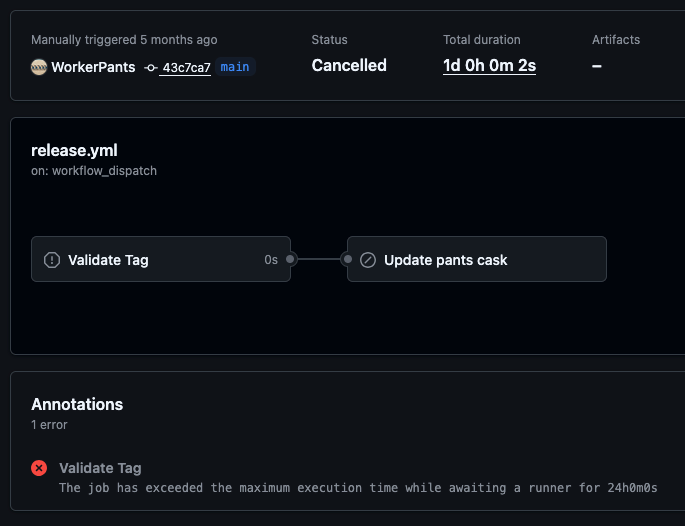
Last month I noticed that one of the Pants actions had waited for 24 hours, but yet, had zero seconds of work done. This specific instance came down to a runner being deprecated and going away, and the action was unable to get a runner - but how is waiting 24 hours even a possibility.
A week after that, I read this blog from Zig about moving from GitHub Actions to Codeberg. Then, under the inexcusable bugs link, I saw comedy gold which explains away all these problems I've been
seeing in a file called safe_sleep.sh:
#!/bin/bash

SECONDS=0
while [[ $SECONDS != $1 ]]; do
    :
done
Goddamn Microsoft, you've done it again.
P.S. Check out the fix if it's not clear why this is such a debacle.