
Syntax Highlighting and Hatred of RegEx
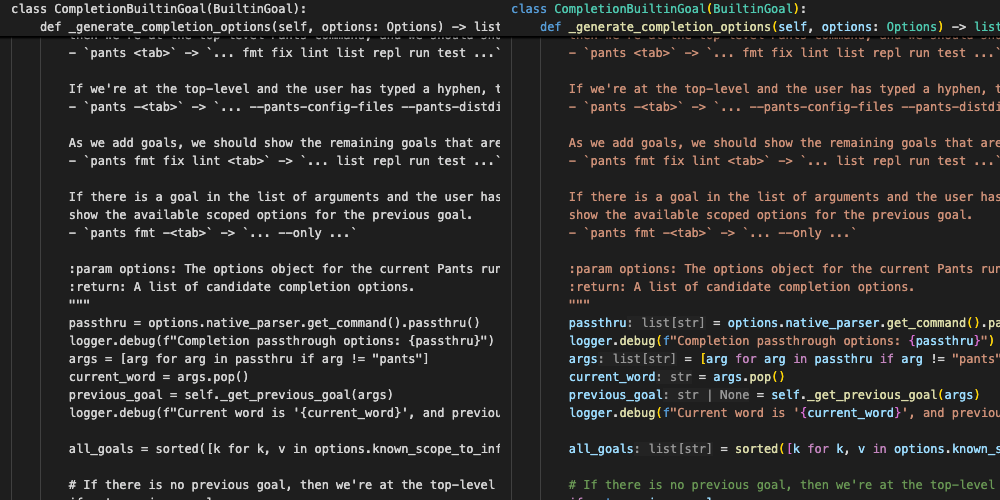
Much like almost anyone reading this, I use (and sometimes overly rely on) syntax highlighting in my IDE. At this point, I just take it for granted that I can open up basically any file and there are contextual colour hints to some degree, and that it will work "fast enough".
However, I've also been around long enough to remember how bad syntax highlighting was for so, so many years. Even with limited highlighting for keywords, parentheses, and comments - I could open up a file and wait a few seconds for the highlighting to kick in. Then, I would make a code change involving a block comment, and I would lose highlighting for the rest of the file until I fixed or worked around the problem. Sometimes, the highlighting would just be plain wrong - due to some legitimate part of the language throwing off the highlighter.
What's really funny (in hindsight) is that basic syntax highlighting was pretty good, and then it wasn't until the IDEs I used tried to add MORE capabilities (like semantic highlighting, or capturing more source context), that everything fell over for many years.
While I could wax nostalgic forever about development quirks from yesteryear, highlighting code hasn't occupied more than two of my brain cells for a long time. Nowadays, if I open VS Code and the source file isn't auto highlighted, I would look around for the first-party extension for the language and I have an LSP and syntax highlighting within a minute.
Except Xcode, obviously
The exception being, as always, Xcode. For years, Swift and Xcode had issues where full file highlighting would just break until some compilation error was fixed, or you re-opened the file, and sometimes you just had to restart Xcode. I've never really looked into this - but just based on behaviour, my guess is that this problem was related to using the results of the SourceKit LSP in order to inform the IDE highlighter what to do using semantic tokens. So, if the LSP falls over on some code, then the syntax tree can't be correctly built and used by the highlighter to colourize the code.
Hilariously timed aside
As I was writing this, I went into Xcode 26 to check something out and immediately noticed this
highlighting quirk. This is 30 seconds of me flipping back and forth between two files and the
same static var is highlighted in one file, but not the other - which seems to get
highlighted, and then lose it's highlighting again. Upon making a change to the file, the
highlighting gets fixed.
TextMate
One of the popular syntax highlighting grammars is TextMate. It was built for the TextMate editor in the mid-2000's and the grammar has been picked up for syntax highlighting in many popular editors and IDEs (e.g. Sublime, VSCode). It's a grammar that is built around regular expressions, and uses the Oniguruma regex library to parse source files into tokens, and then the tokens are mapped to colours.
Here is an example of one that I use in Suspenders for syntax highlighting Pants BUILD files. Those files are basically stripped down Python, so I copied the MagicPython grammar - which comes in at a whopping 4200 lines of rules. This file happens
to be json, but they can also be .plist or maybe other file types.
Fun fact, this snippet was highlighted offline by ShikiJS which uses TextMate grammars, the Oniguruma engine, and was colourized with the synthwave-84 theme based on the generated tokens.
{
  "version": "https://github.com/MagicStack/MagicPython/commit/7d0f2b22a5ad8fccbd7341bc7b7a715169283044",
  "name": "MagicPython",
  "scopeName": "source.pantsbuild",
  "patterns": [
    {
      "include": "#statement"
    },
    {
      "include": "#expression"
    }
  ],
  // ...
  "statement-keyword": {
    "patterns": [
    {
        "name": "storage.type.function.pantsbuild",
        "match": "\\b((async\\s+)?\\s*def)\\b"
    },
    {
        "name": "keyword.control.flow.pantsbuild",
        "comment": "if `as` is eventually followed by `:` or line continuation\nit's probably control flow like:\n    with foo as bar, \\\n         Foo as Bar:\n      try:\n        do_stuff()\n      except Exception as e:\n        pass\n",
        "match": "\\b(?<!\\.)as\\b(?=.*[:\\\\])"
    },
    {
        "name": "keyword.control.import.pantsbuild",
        "comment": "other legal use of `as` is in an import",
        "match": "\\b(?<!\\.)as\\b"
    },
    //...
    ],
    //...
  }
}
While powerful, I would never want to write one of these - especially since they're based on
regular expressions, which are my all-time most hated programming construct. I'd rather goto than regex.
Elephant in the room
The underlying regex engine was archived on April 24, 2025. It's history file suggests it's been released since February 25, 2002. 23 years is a great run for one primary maintainer. A question on the vscode-oniguruma bindings library which has remained unanswered since May wonders what will happen next. Since there is such a tight integration of TextMate grammars into VSCode - my guess would be that VSCode forks the original repo and maintains it for security fixes. However, the lack of feedback on that ticket is definitely a cause for concern.
Tree-sitter
The other popular syntax highlighting library is Tree-sitter. It can quickly parse source files to syntax trees, but where it particularly shines is incremental parsing and updating that syntax tree (e.g. parsing as you type keys). Now is a good time to point out that the syntax tree doesn't, itself, highlight anything - but rather the tokens it generates (i.e. the range of text in a file and the meaning represented by the text) can be mapped to colours.
While there are many editors and IDEs (and maybe sometimes Github) that use Tree-sitter, I've become intimately familiar with it as I migrate away from VSCode, towards the promise land of Neovim. That's a discussion for another day, but Neovim uses Tree-sitter for highlighting, and you can install the specific language grammars you need for your work (many of them located at the Tree-sitter organization).
The general ambient consensus in my area of the internet is that Tree-sitter is superior to TextMate. Why? I'm not entirely sure. My guess is that it's based mostly on incremental parse speed, but because I've never quantified the speed of both - I can't say for sure. Tree-sitter does feel INSANELY fast though, while TextMate just seems sanely fast. As in, Tree-sitter tells me parse speed in kB per MILLIsecond! For me, however rare an event this would be, it's that I would never want to write a TextMate grammar - but I could see myself writing a Tree-sitter one. While not simple by any stretch, the ones I've reviewed are much more compact and logical to read through.
Fortunately, one of the Pulsar devs wrote down some thoughts on this matter a couple of years ago and they would have far more insight on this than I ever would:
Here are a few reasons why Pulsar is using Tree-sitter at all, and why Pulsar is configured to prefer a Tree-sitter grammar over a TextMate grammar when both are present:
- Tree-sitter can offer far more accurate and specific syntax highlighting.
- It can give you better understanding of context. For example: it makes it much easier to write snippets that can behave differently based on the context of the cursor.
- It makes it much easier for grammar authors to describe features like code folding and indentation hinting — making Pulsar smarter and easier to work with.
- It allows for smarter code navigation — meaning a more modern and flexible way to view the important symbols in your current file.
- It offers package authors a richer system for working with source code files. The syntax tree generated by Tree-sitter can be consumed by packages and leveraged in a number of ways.
What about LSPs?
As shown in my Xcode example, LSPs can choose to send semantic tokens and provide syntax highlighting that would be superior in quality to either TextMate or Tree-sitter - since it would know the provenance of files and variables. For instance, either grammar could colourize a variable and maybe track some of it's scoping, but the LSP would know whether that variable is a local, global, static, constant - even if it was imported from another file or library.
The obvious downside is that the LSP would need to run some phases of compilation before it could be more well-informed than TextMate or Tree-sitter, and that takes some amount of time (wildly different amounts depending on the language and size of the codebase). Then that information would be sent from the out-of-process LSP to your editor, where it would then action it. As I showed in my Xcode example, it's not necessarily a great experience - even after years of work.
Lastly, using this method would require that the LSP developers add this non-trivial functionality to the LSP (which many haven't). In that case, you still fall back to one of the grammars anyways.
Why do I even care?
As I mentioned, as I switch to Neovim, I'm also switching to Tree-sitter. As I also mentioned, there are already a number of grammars available online for most of the languages I use.
That's right, mostly. See, I'm learning Jai... and as it turns out, there aren't any Tree-sitter grammars for Jai - as it's a language in a closed beta.
So... If I'm going to have a decent development experience, I'm going to have to do it myself. More on this later...
Note: As it turns out, I was wrong... There IS a publically available tree-sitter for Jai, I just suck at Googling (or maybe Google sucks at Googling). I didn't find this out until after I'd made a few days of progress, and the sunk-cost fallacy won me over