
Generating Raylib Bindings With and For Jai
As I mentioned a few months ago, I received access to the Jai closed beta last year. I’ve been chipping away at tooling around the language and learning as much as I can, but it was a busy year so I didn’t make as much progress as I would like. I also ran into some odd rendering issues that seem to be related to not having X11 installed on my Fedora 43 COSMIC Atomic installation.
Working with Jai is also a big part of my Year of Deshittification. Writing simpler code, with less compile-time iteration is so nice...
I started working on a VSCode plugin and while working on the LSP, I wiped and re-installed the machine I was working on without actually backing up most of my data. Not a big deal though, as I could always do it again.
The part I forgot about entirely was how to generate bindings for C libraries (e.g. libuv). I remember the first time I ever tried it last year, it only took about 10 minutes to figure it out and get it running, so I recalled it being a trivial thing to do. However, a ran into a strange mental blockwhere I randomly began to think that creating bindings was this really hard, convoluted process.
Keeping in mind that there are tons of examples on Github and in the Jai standard modules - so this is inordinately silly. And, as it turned out, I had saved the generation code - just in a different repo.
Either way, the sheer fact that I couldn't remember how I did this makes it clear that I should walk through some bindings step-by-step and write that down here as a reference. And since I want to learn how to make some small games, binding to Raylib seems obvious.
It's so easy
Briefly, you write a small compile-time program (in Jai) which runs the binding generator with a small set of options/tweaks. That program will then create the appropriate library bindings, which then get linked to based on the instructions you provide. Then it's fair game to use those bindings and the library in your application.
For this article, I'm using Jai 0.2.023.
% jai -version
  Version: beta 0.2.023, built on 27 December 2025.
A do-nothing generator
This is a bare-bones generator structure (actually, it could be inlined further, but this is a better structure for anything non-trivial).
#import "Bindings_Generator";
#import "Compiler";

#run build();

build :: () {
  set_build_options_dc({do_output = false});
  if !generate_bindings() {
    compiler_set_workspace_status(.FAILED);
    return;
  }
}

generate_bindings :: () -> bool {
  // Currently using a single bindings file for all platforms
  // Situationally this gets split out into per-platform bindings
  output_filename: string = "bindings.jai";

  // Create a default struct of options
  opts: Generate_Bindings_Options;

  // Call the actual generator
  return generate_bindings(opts, output_filename);
}
Unsurprisingly, it doesn't do much...
% jai generate.jai

  generating 0 global scope members...
      0 functions
      0 structs
      0 enums

  OK! generated 'bindings.jai'
And thus doesn't generate much...
//
// This file was auto-generated using the following command:
//
// jai generate.jai
//

#scope_file

#import "Basic"; // For assert
Setting up a project
Quick digression on how to structure a folder to make life easier. Jai will automatically look
in the stdlib modules directory, or the local project's modules directory for imports. It's also looking for a module.jai file specifically.
I grabbed the latest Raylib release files from GitHub and unpacked the Linux x64 files to modules/raylib/... - while the
jai files were in the top-level raylib directory. Setting up a project like this
should allow for #import "raylib" to work out of the box.
% tree

  .
  ├── modules
  │   └── raylib
  │       ├── generate.jai
  │       ├── bindings.jai
  │       ├── module.jai
  │       └── raylib-5.5_linux_amd64
  │           ├── CHANGELOG
  │           ├── include
  │           │   ├── raylib.h
  │           │   ├── raymath.h
  │           │   └── rlgl.h
  │           ├── lib
  │           │   ├── libraylib.a
  │           │   ├── libraylib.so -> libraylib.so.550
  │           │   ├── libraylib.so.5.5.0
  │           │   └── libraylib.so.550 -> libraylib.so.5.5.0
  │           ├── LICENSE
  │           └── README.md
  └── helloworld.jai
Generate bindings from the header
To get something to actually happen, we'll need to point the generator at actual the library's definitions:
#import "Basic";
#import "Bindings_Generator";
#import "Compiler";

#run build();

build :: () {
  set_build_options_dc({do_output = false});
  if !generate_bindings() {
    compiler_set_workspace_status(.FAILED);
    return;
  }
}

generate_bindings :: () -> bool {
  output_filename: string = "bindings.jai";
  opts: Generate_Bindings_Options;

  // Let the generator know about the important header(s)
  array_add(*opts.source_files, "raylib-5.5_linux_amd64/include/raylib.h");

  return generate_bindings(opts, output_filename);
}
And hey, look at that, it built stuff! Wait, why did it strip declarations and skip all the functions?
% jai generate.jai

  generating 715 global scope members...
      0 functions
      36 structs
      21 enums
      2 system declarations were ignored.
      581 declarations were stripped!

  OK! generated 'bindings.jai'
Looking at the generated bindings, they seem fine...
//
// This file was auto-generated using the following command:
//
// jai generate.jai.first
//

RAYLIB_VERSION_MAJOR :: 5;
RAYLIB_VERSION_MINOR :: 5;
RAYLIB_VERSION_PATCH :: 0;
RAYLIB_VERSION :: "5.5";

PI :: 3.14159265358979323846;

DEG2RAD :: PI/180.0;

...

// Rectangle, 4 components
Rectangle :: struct {
    x:      float; // Rectangle top-left corner position x
    y:      float; // Rectangle top-left corner position y
    width:  float; // Rectangle width
    height: float; // Rectangle height
}

// Image, pixel data stored in CPU memory (RAM)
Image :: struct {
    data:    *void; // Image raw data
    width:   s32; // Image base width
    height:  s32; // Image base height
    mipmaps: s32; // Mipmap levels, 1 by default
    format:  s32; // Data format (PixelFormat type)
}
Let's build our helloworld.jai and see what happens:
#import "raylib";

main :: () {
  screen_width :: 640;
  screen_height :: 480;

  InitWindow(screen_width, screen_height, "Hello world");
  CloseWindow();
}
% jai helloworld.jai
In Workspace 2 ("Target Program"):
helloworld.jai:1,1: Error: Cannot load the module 'helloworld/modules/raylib' because it is missing the file 'module.jai'.
#import "raylib";
helloworld.jai:1,1: Error: Unable to find a module called 'raylib' in any of the module search directories.
#import "raylib";Oops, forgot to actually add a module.jai (in spite of what the tree above lied about)
#if OS == .LINUX {
  #load "bindings.jai";
} else {
  #assert false "Only linux support right now...";
}
Trying again...
% jai helloworld.jai

  Error: Undeclared identifier 'InitWindow'.
Damn.
The bad kind of stripping
What's going on here? Well, the bindings output spells it out pretty plainly:
raylib.h:968:12: Stripping function that's missing from foreign libs: InitWindow
raylib.h:969:12: Stripping function that's missing from foreign libs: CloseWindow
raylib.h:970:12: Stripping function that's missing from foreign libs: WindowShouldClose
...
It's caused by a configurable enum set (opts.strip_flags) and defaults to stripping
out symbols where there is no associated lib (and also va_list stuff).
So, let's point to the library and see if we can get a better result:
#import "Basic";
#import "Bindings_Generator";
#import "Compiler";

#run build();

build :: () {
  set_build_options_dc({do_output = false});
  if !generate_bindings() {
      compiler_set_workspace_status(.FAILED);
      return;
  }
}

generate_bindings :: () -> bool {
  output_filename: string = "bindings.jai";
  opts: Generate_Bindings_Options;
  array_add(*opts.source_files, "raylib-5.5_linux_amd64/include/raylib.h");

  // Point to the other includes and the libs
  array_add(*opts.include_paths, "raylib-5.5_linux_amd64/include");
  array_add(*opts.library_search_paths, "raylib-5.5_linux_amd64/lib");
  array_add(*opts.libraries, {filename="libraylib"});

  return generate_bindings(opts, output_filename);
}
Annnnd re-generating...
% jai generate.jai

  generating 716 global scope members...
      581 functions
      36 structs
      21 enums
      2 system declarations were ignored.

  OK! generated 'bindings.jai'
Sweet, back in business. And yep, the functions are in bindings.jai and they point
to Raylib for an implementation.
...
// Window-related functions
InitWindow :: (width: s32, height: s32, title: *u8) -> void #foreign libraylib;
CloseWindow :: () -> void #foreign libraylib;
WindowShouldClose :: () -> bool #foreign libraylib;
...
Let's compile our app and see how awesome it is:
% jai helloworld.jai

  lld-linux: error: undefined symbol: pow
  >>> referenced by rtext.c
  >>>               rtext.o:(stbtt__cuberoot) in archive helloworld/modules/raylib/raylib-5.5_linux_amd64/lib/libraylib.a
  >>> referenced by rtext.c
  >>>               rtext.o:(stbtt__cuberoot) in archive helloworld/modules/raylib/raylib-5.5_linux_amd64/lib/libraylib.a
  >>> referenced by rtextures.c
  >>>               rtextures.o:(stbi__loadf_main) in archive helloworld/modules/raylib/raylib-5.5_linux_amd64/lib/libraylib.a

  lld-linux: error: undefined symbol: sqrt
  lld-linux: error: undefined symbol: sqrtf
  ...
...Sigh... Well crap...
POW! Right in the sqrt
Though, this makes sense - RayMath imports <math.h> - and I haven't really
told the bindings where to find that. So, I'll link that in a generated footer, at the bottom of
the bindings file:
#import "Basic";
#import "Bindings_Generator";
#import "Compiler";

#run build();

build :: () {
  set_build_options_dc({do_output = false});
  if !generate_bindings() {
      compiler_set_workspace_status(.FAILED);
      return;
  }
}

generate_bindings :: () -> bool {
  output_filename: string = "bindings.jai";
  opts: Generate_Bindings_Options;

  array_add(*opts.source_files, "raylib-5.5_linux_amd64/include/raylib.h");
  array_add(*opts.include_paths, "raylib-5.5_linux_amd64/include");
  array_add(*opts.library_search_paths, "raylib-5.5_linux_amd64/lib");
  array_add(*opts.libraries, {filename="libraylib"});

  // Add this to the bottom of the generated file
  opts.footer = FOOTER;

  return generate_bindings(opts, output_filename);
}

FOOTER :: #string EOF
  #if OS == .LINUX {
    libm :: #library,system,link_always "libm";
  } else {
    #assert false "Only linux support right now...";
  }
EOF;
Re-trying the compilation...
% jai helloworld.jai

  Stats for Workspace 2 ("Target Program"):
  Lexer lines processed: 12651 (19884 including blank lines, comments.)
  Front-end time: 0.162626 seconds.
  llvm      time: 0.377990 seconds.

  Compiler  time: 0.540616 seconds.
  Link      time: 0.000477 seconds.
  Total     time: 0.541093 seconds.
Boom! Nailed it. Let's see it in action...
% ./helloworld

  INFO: Initializing raylib 5.5
  INFO: Platform backend: DESKTOP (GLFW)
  INFO: Supported raylib modules:
  INFO:     > rcore:..... loaded (mandatory)
  INFO:     > rlgl:...... loaded (mandatory)
  INFO:     > rshapes:... loaded (optional)
  INFO:     > rtextures:. loaded (optional)
  INFO:     > rtext:..... loaded (optional)
  INFO:     > rmodels:... loaded (optional)
  INFO:     > raudio:.... loaded (optional)
  ...
  INFO: Windows closed successfully
Well, not much to see - just a flash of a window opening and closing, but that's pretty good. Now, let's run a hello world we can see...
Now for an actual hello to the world
#import "raylib";

main :: () {
  screen_width :: 640;
  screen_height :: 480;

  InitWindow(screen_width, screen_height, "Hello world");

  SetTargetFPS(60);
  while !WindowShouldClose() {
    BeginDrawing();
    ClearBackground(RAYWHITE);
    DrawText("Congrats! You created your first window!", 190, 200, 20, LIGHTGRAY);
    EndDrawing();
  }

  CloseWindow();
}
Which compiles to...
% jai helloworld.jai

  In Workspace 2 ("Target Program"):
  helloworld/helloworld.jai:12,21: Error: Undeclared identifier 'RAYWHITE'.

      while !WindowShouldClose() {
        BeginDrawing();
        ClearBackground(RAYWHITE);
Oh come on...
Intentional, but surprising
This seems to happen while trying to run C from several languges (notably Swift), but macro functions are often accidentally, or intentionally, not bound/ignored. That was a mild surprise, but I solved that by just pulling those colours into the module manually.
However, there is no warning that this was missed, so a handy option is opts.log_unsupported = true;
With that, I would have seen:
Macro RAYWHITE: Couldn't find reference for identifier CLITERAL
Macro GRAY: Couldn't find reference for identifier CLITERAL
Macro BLACK: Couldn't find reference for identifier CLITERAL
...
Ah, that makes sense. Jai couldn't find the CLITERAL... Some say it's a myth...
So, I'll just add those manually to the module.jai file:
...
WHITE     :: Color.{ 255, 255, 255, 255 };   // White
BLACK     :: Color.{ 0, 0, 0, 255 };         // Black
BLANK     :: Color.{ 0, 0, 0, 0 };           // Blank (Transparent)
MAGENTA   :: Color.{ 255, 0, 255, 255 };     // Magenta
RAYWHITE  :: Color.{ 245, 245, 245, 255 };   // My own White (raylib logo)
Also, small tweak to the example to make it more Jai-ish, by adding defers.
#import "raylib";

main :: () {
  screen_width :: 640;
  screen_height :: 480;

  InitWindow(screen_width, screen_height, "Hello world");
  defer {
    CloseWindow();
  }

  SetTargetFPS(60);
  while !WindowShouldClose() {
    BeginDrawing();
    defer {
      EndDrawing();
    }
    ClearBackground(RAYWHITE);
    DrawText("Congrats! You created your first window!", 190, 200, 20, LIGHTGRAY);
  }
}
Annnnnnnndddddd?
% jai helloworld.jai

  Stats for Workspace 2 ("Target Program"):
  Lexer lines processed: 12662 (19893 including blank lines, comments.)
  Front-end time: 0.156325 seconds.
  llvm      time: 0.343080 seconds.

  Compiler  time: 0.499404 seconds.
  Link      time: 0.000475 seconds.
  Total     time: 0.499879 seconds.
Finally!
Upon running, we see something that looks like this (I grabbed this image from the Raylib website since my laptop is out of computing juice right now):
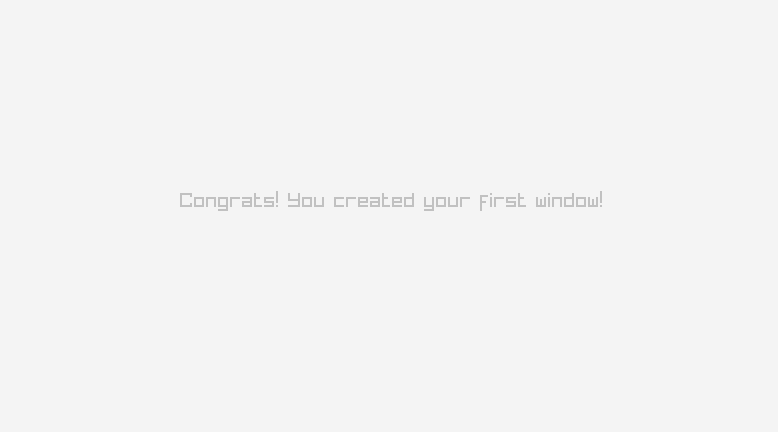
I haven't exercised the totality of Raylib in doing this, but it basically "just works" for the basics. As I need more functionality, I'll add it into the bindings.
Why is it so slow?
0.5 seconds might not seem slow, but for Jai, for a debug project this small, 0.5 seconds is an eternity (even pulling in the Raylib code).
... Ah bugger... llvm time: 0.343080 seconds.
Turns out that on this computer, I forgot to alias the -x64 backend.
% jai -x64 helloworld.jai

  Lexer lines processed: 12662 (19893 including blank lines, comments.)
  Front-end time: 0.161221 seconds.
  x64       time: 0.005103 seconds.

  Compiler  time: 0.166323 seconds.
  Link      time: 0.000435 seconds.
  Total     time: 0.166758 seconds.
Ahhhhh... There it is...
It's worth pointing out that I run the Jai compiler on my dual-core i5 Macbook Air from 2017 and it compiles apps faster than some of my Vite-served web UIs can re-render a text change on an Mac Mini M2 Pro.
Bells and whistles
There's a lot of cool stuff you can do when generating bindings. One of them is to grab out parts of the AST, in case there are items you want to ignore or modify. For instance, from Overlord System's libsodium bindings:
...
  opts.visitor = visitor;
...

DECLARATIONS_TO_OMIT :: string.[
  "_sodium_alloc_init",
  "_sodium_runtime_get_cpu_features",
  ...
];

visitor :: (decl: *Declaration, parent_decl: *Declaration) -> Declaration_Visit_Result {
  if !parent_decl && array_find(DECLARATIONS_TO_OMIT, decl.name) {
    decl.decl_flags |= .OMIT_FROM_OUTPUT;
    return .STOP;
  }
  return .RECURSE;
}
Anyways, I'll be hosting the handful of bindings I need in a monorepo cleverly called jai-bindings. I'm not sure exactly how I'll manage or maintain these going forward, but my guess is that I'll just keep a clone somewhere on my machine, and symlink projects to the relevant directories. Jai doesn't have a package manager, and I'm more and more coming to Ginger Bill's conclusion that Package Managers are Evil.